What are VPNs?
A VPN (Virtual Private Network) is a must-use tool in today’s world, you either use or accept that your ISP, government, and every ad company on the world knows exactly what you do online.
This is Part 1 of a multi-part writing about VPNs. This one covers the basics: what is a VPN, how it protects you, what makes a good VPN provider, and why free VPNs are worse than using nothing at all.
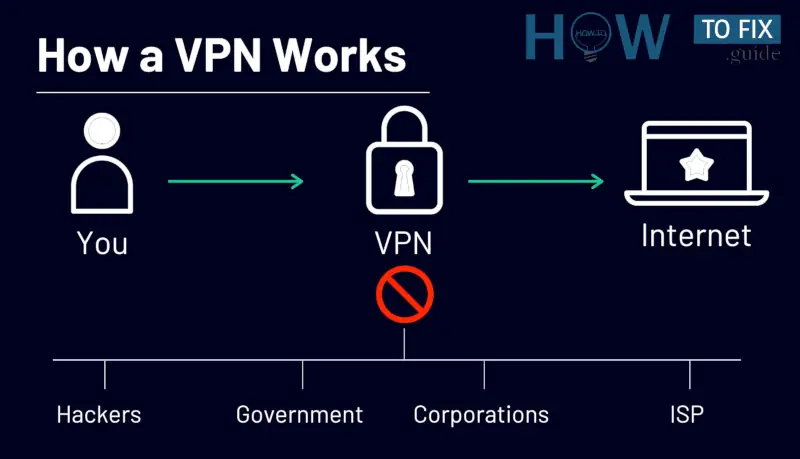 image source: https://howtofix.guide/vpn/.
Why Privacy Matters
Internet privacy has been under attack for many years now. Governments want to know what you’re doing online to prevent protesters from rising up. ISPs (Internet Service Providers) want to sell and share what you’re doing online to make money. Advertisers want to profile what you’re doing online to show you relevant ads. And data brokers want to package all of the above and sell it to whoever pays.
A VPN won’t solve every privacy problem (nothing will), but it plugs a massive hole. It removes your ISP from spying on you by encrypting your Internet connection and routing it through a server you choose (like a forward proxy). Instead of your ISP seeing that you visited example.com, they see encrypted traffic going to a VPN server IP address. That’s it. They know you’re using a VPN, but they can’t see what’s inside the tunnel (the VPN provide can though, so choose wisely).
What a VPN Actually Does
A VPN creates an encrypted tunnel between your device and a VPN server. All of your internet traffic passes through this tunnel before reaching the public Internet.
When you connect to a VPN, several things happen. First, your VPN client in your device (computer, phone, etc.) establishes an encrypted connection to a VPN server using a protocol like WireGuard or OpenVPN. This involves a cryptographic handshake where your device and the server authenticate each other and agree on session encryption keys.
Once the tunnel is up, your device creates a virtual network interface and all outgoing traffic gets routed through this interface. The VPN client encrypts each packet, wraps it in a new UDP (or TCP) packet addressed to the VPN server, and sends it out through your real network interface. This is called encapsulation, you’re putting an encrypted packet inside a regular packet.
On the server side, the reverse happens. The VPN server receives the outer packet, strips the encapsulation, decrypts the inner packet, and forwards it to the destination on the public internet. The response follows the same path back: the destination server sends its response to the VPN server, the VPN server encrypts it, sends it through the tunnel to your device, and your device decrypts it.
So a VPN provides these benefits:
- Your IP Address is Hidden: Websites and services you connect to see the VPN server’s IP address, not yours. This means they can’t determine your physical location or tie your activity to your home network.
- Your ISP Cannot See your Traffic: Your ISP can only see encrypted packets going to a VPN server IP. They don’t know what websites you’re visiting, what you’re downloading, or what services you’re using.
- DNS Queries go Through the Tunnel: A properly configured VPN routes your DNS lookups through the encrypted tunnel and resolves them on the VPN provider’s DNS servers (or a DNS server of your choosing). This prevents DNS leaks, which are one of the most common ways that VPN users accidentally expose their browsing activity. Without DNS leak protection, your browser might still send DNS queries to your ISP’s resolver even though your actual traffic goes through the VPN.
- All Traffic is Encrypted in Transit: Even if someone intercepts the packets between your device and the VPN server (for example, on a public Wi-Fi network), they see nothing but encrypted data.
- View Content From Any Location (Bonus): A bonus benefit is that you can connect to a VPN server in a different country and view content that is blocked in your own country.

Types of VPN Protocols
A VPN protocol is the set of rules that determines how your data is encrypted and transmitted between your device and the VPN server. The 2 main VPN protocols today are WireGuard and OpenVPN.
OpenVPN
The OG protocol.
OpenVPN is fully configurable, you can choose your cipher (AES-256-GCM, AES-256-CBC), your key exchange method (RSA 2048/4096, ECDH), your authentication algorithm (SHA-256, SHA-512), and your transport layer (UDP, TCP).
This means OpenVPN can be configured for very specific scenarios, which is useful in some enterprise environment and environment complex censorship infrastructure.
The key exchange process in OpenVPN works through TLS handshakes (the same mechanism used by HTTPS). When your client connects to a server, they perform a TLS handshake using X.509 certificates and/or pre-shared keys to authenticate each other and establish a session key. This session key is then used for the symmetric encryption of your actual traffic.
This means you can configure OpenVPN to route traffic over TCP on port 443, which is really useful in restrictive network environments because it’s essentially indistinguishable from regular HTTPS traffic at the connection level. A deep packet inspector can tell the difference if they analyze the TLS fingerprint and traffic patterns, but basic firewalls that simply allow port 443 traffic will let it through. This makes OpenVPN a useful in censored environments and environment with complex security restrictions.
The downside is that it has a large codebase, which means a larger attack surface and overhead, making the connections slower than WireGuard.
WireGuard
WireGuard is today’s standard and the go-to option for most use cases.
Instead of allowing you to configure your VPN connections with as many options as you want, you get a pre-selection of the best modern options and that’s it.
During a WireGuard handshake, the initiator sends a handshake initiation message with its ephemeral public key and its static public key (encrypted). The responder verifies the initiator’s identity using the pre-configured public key, generates its own ephemeral key pair, performs 4 Diffie-Hellman calculations using combinations of the static and ephemeral keys, and sends back a handshake response. The both sides now derive identical symmetric session keys from these shared secrets.
WireGuard also supports an optional pre-shared symmetric key (PSK) that can be configured per-peer. This provides an additional layer of symmetric encryption on top of the asymmetric cryptography, which is specifically designed to protect against potential future quantum computing attacks on Curve25519.
The handshake automatically re-keys every few minutes to maintain perfect forward secrecy. If an attacker somehow compromises a session key, they can only decrypt traffic from that specific session, not past or future sessions.
Also, the WireGuard codebase is much smaller than OpenVPN, which means less overhead and exposure.
Also important, WireGuard was originally designed with static IP assignments per peer, meaning the server needs to know which public key maps to which tunnel IP. Some VPN providers (for example, NordVPN with their NordLynx implementation) have built systems on top of WireGuard to address this, using double NAT or ephemeral key rotation so that the server doesn’t persistently associate your public key with your activity. Mullvad and Proton both handle this transparently in their implementations.
WireGuard only operates over UDP, which is great for speed but can be a problem on networks that restrict UDP traffic. It also doesn’t have built-in traffic obfuscation, meaning deep packet inspection can identify it as a VPN connection based on the packet structure.
Which Should You Use?
For most users, WireGuard is the better choice, it is faster and has a smaller attack surface. Both Mullvad and Proton VPN support it as its default.
Since OpenVPN is much more customizable, it works great in environments with restrictive firewalls, networks that block UDP traffic, or censored Internet environments where you need to hide inside TCP port 443 traffic.
Proton VPN supports both protocols while Mullvad went WireGuard-only, but added Shadowsocks obfuscation and UDP-over-TCP to compensate for the censorship-bypass scenarios where OpenVPN shines.
Using a VPN on Windows vs Linux
You might think the underlying OS doesn’t matter as much, you are wrong. I won’t be talking about MacOS/Apple because their products are garbage, hate being locked in an ecosystem.
Windows and Telemetry
Windows collects a lot of telemetry data by default and most of it is “Required” by Microsoft (why would someone willingly choose Windows as its main OS is beyond me).
Some of the required telemetry in Windows includes device specifications, hardware config, OS version, driver information, system crash reports, and Windows Update status. “Optional” adds app usage patterns, browsing history from Edge, inking and typing patterns, and enhanced error reporting. Your typing patterns… hmm...
These telemetry endpoints are hardcoded in the OS and while you can block them at the firewall or DNS level, Windows updates usually re-enable telemetry settings and add new endpoints.
So you can have a VPN running, encrypting all your internet traffic, and Windows is still phoning home to Microsoft through that same encrypted tunnel. Your ISP can’t see the telemetry data because it’s going through the VPN, but Microsoft can (because they’re the destination). You moved the surveillance from your ISP to Microsoft. Progress I guess?
Linux and Control
Linux takes the opposite approach. Most distributions collect zero telemetry by default. No background service phoning home. No usage analytics. No mandatory cloud integration. The OS doesn’t make network connections you didn’t explicitly configure (you can opt-in of course).
On a Linux system, you have full transparency over every network connection. You can run ss -tunap or netstat to see exactly what’s communicating and to where and see which services are running with systemctl. This means that on a Linux machine with a VPN running, the only traffic leaving your system is traffic you knowingly generated.
On Linux, WireGuard runs as a kernel module (wireguard.ko), meaning the encryption and decryption happen in kernel space with minimal context switching overhead. The virtual interface (wg0) is a first-class kernel network interface.
You can also control more in depth how the VPN integrates with your system:
nftables/iptablesfor Firewall Rules: You can build a kill switch that drops all traffic if the VPN tunnel goes down, ensure that only VPN traffic leaves your machine, or route specific applications through or around the VPN tunnel. On my setup, I usenftablesrules to run both Mullvad and Tailscale simultaneously (more details here).- Network Namespaces for Application Isolation: Linux network namespaces let you create entirely separate networking environments per process or group of processes (cgroups). You can put a specific application in a namespace that only has access to the VPN interface, making it physically impossible for that application to leak traffic outside the tunnel.
resolvectl/systemd-resolvedfor DNS Control: You can configure per-interface DNS settings, ensuring that DNS queries always go through the VPN’s DNS servers and never leak to your ISP’s resolver. On Fedora and most modern distributions,systemd-resolvedhandles this cleanly when the VPN connection is configured correctly.
In the End
It DOES matter…
A VPN on Windows still protects your traffic from your ISP, but if you care about privacy, use a VPN on Linux. On Linux, you know exactly what traffic is leaving your machine and where it’s going.
Zero-Knowledge VPN Providers
Most VPN providers are garbage, they are usually honeypots that get your data and sell it, some throw around the concept of “no-log VPN” but have no evidence or audits to back it up.
What you want is a zero-knowledge VPN provider: one that is technically and operationally designed so that even if their servers were seized or they were compelled by law enforcement, they would have nothing useful to hand over.
A truly zero-knowledge VPN service has:
- No logging of user activity, traffic, connection timestamps, or metadata.
- No requirement for personal information during signup (no email, no name).
- Anonymous payment options (cryptocurrency like Monero, cash).
- Regular independent security audits that verify these claims.
- Open-source clients so the code can be independently reviewed.
The are more VPNs but I have only experience with Mullvad and Proton VPN, so I’ll talk about them below.
Proton VPN
Proton VPN is really good and has a solid track record.
Proton is based in Switzerland, a country with strong privacy laws, however the country is currently considering new surveillance legislation (the OSCPT ordinance) that could impact privacy. The “good” thing is that Proton is already moving some infrastructure to the EU as a precaution, but the whole EU is moving to an anti-privacy stance, so it might completely worthless.
No-Logs Policy
Proton VPN maintains a no-logs policy that has been independently verified. They’ve now passed 4th consecutive annual third-party audits, which is a good thing.
Local Infrastructure
Proton runs their VPN on bare-metal servers they fully own and control. There is no 3rd-party cloud provider or middle man that could get user data from the physical hardware.
Security Audits
Proton passed a SOC 2 Type II audit in 2025, which verifies the proper implementation of security controls across their infrastructure. This is a different kind of audit from the no-logs verification; it validates their overall security posture and operational controls.
The Interesting Part
Proton is secure and all, but they have a pattern of handing over user data to authorities when compelled by Swiss courts, and it has led to real people being identified and arrested.
In 2021, Proton Mail provided the IP address of a French climate activist to Swiss authorities, who shared it with French police. In 2024, they handed over a recovery email address that Spanish police used to identify a Catalan independence activist. And just this week, 404 Media reported that Proton Mail provided payment data that the FBI used to unmask an anonymous Stop Cop City protester in Atlanta.
Proton’s defense is always the same: they comply with Swiss court orders, they can’t decrypt email content, and they only hand over what limited metadata they have. They also emphasize that their VPN service, unlike Proton Mail, doesn’t log IP addresses, so the VPN side hasn’t been implicated in these cases. That distinction matters, but makes you not trust them 100% (at least in my case, specially after hearing the CEO opinions on some matters).
Some key takeaways from these is to not pay Proton with a credit card, and use a fake recovery email, do your opsec homework.
Mullvad VPN
This is another good option for a zero-knowledge VPN with pros and cons.
Mullvad is based in Sweden which also has strong privacy protection laws (but again, as all EU, they are moving to an anti-privacy state).
Signup Process
The signup process is incredible and tells you everything you need to know about their philosophy. No email. No name. No nothing. You click “Generate account number” and get a randomly assigned 16-digit number. That’s your ID. Done.
Anonymous Payment
For payment, you can use credit card or PayPal (less private), cryptocurrency like Bitcoin and Monero (more private), or you can literally put cash in an envelope with your account number and mail it to their office in Sweden. They’ll open the envelope, add time to your account, and shred the paper. This level of anonymous access is unmatched, love it.
No-Logs Policy
Mullvad has been independently audited multiple times by security firms and found zero critical, high, or medium-severity issues, only a single low-severity input validation weakness that was promptly fixed. You can see the audit information in their website.
A good evidence of this came in 2023, when Swedish police physically showed up at Mullvad’s office with a search warrant, intending to seize computers with customer data. Mullvad’s staff demonstrated how their service works and that no customer data existed. After consulting the prosecutor, the police left without taking anything.
The Interesting Part
Some people claim Mullvad is a government honeypot, designed to attract privacy-conscious users, which could be true… or not?
Their service is very good but I can’t prove this isn’t the case. I trust the independent audits, open-source, anonymous sign-up, and anonymous payment methods provided as a good sign on a privacy-first company. I could be wrong though, its just a matter of trust.
The Dangers of Free VPNs
Free VPNs are (usually) a privacy nightmare, worse than no VPN at all if I’m honest.
Running a VPN service costs money. If a VPN is not charging you, they are making money by selling your data.
Some recommended reads about the topic:
- Are free VPNs safe? Here’s what the research says
- VPN Transparency Report 2025
- 60% of free VPNs could be selling your data by 2025
What a VPN Doesn’t Protect You From
Some of VPN marketing claims like “complete anonymity” is bullshit, here’s the truth:
- A VPN Doesn’t Make You Anonymous: If you log into Google while connected to a VPN, Google still knows exactly who you are. You typed in your username and password. The VPN hides your IP address from the destination, but it doesn’t change your login session, your browser fingerprint, etc. If you’re using a VPN to “hide from Google” while logged into Gmail, I have bad news for you.
- A VPN Doesn’t Protect Against Browser Fingerprinting: Your browser reveals a lot of identifying information about you: screen resolution, installed fonts, GPU renderer, timezone, language settings, installed plugins, canvas rendering, WebGL, etc. This combination is often unique enough to identify you without ever needing your IP address. A VPN doesn’t change any of this, you will still be identified. More details on fingerprinting here.
- A VPN Doesn’t Guarantee That Your VPN Provider Isn’t Logging Your Data: By using a VPN, you’re shifting trust from your ISP to your VPN provider. Your VPN provider can theoretically see all your traffic, however, a good VPN provider has a verified no-logs policy and audited infrastructure to protect you. Your ISP has none of these. So you’re trading a guaranteed spy for a hopefully-trustworthy middleman. Choose wisely.
A Quick Summary
Get a VPN. Use it. Pay for it with Monero or similar privacy-first cryptocurrency.
Choose a reliable VPN provider that has been audited, is open-source, has anonymous payment options, and a good track record of protecting user data from law enforcement. Mullvad and Proton VPN are the two I recommend but there are more, do your own research.
Avoid free VPNs. They are not free. You’re paying with your data, which is sold to who knows who.
VPNs don’t provide complete anonymity. Combine it with a privacy-focused browser (Firefox-or forks with hardened settings for example - more details here), a content blocker (uBlock Origin), encrypted DNS, etc. There is no perfect privacy but some is better than nothing.
Part 2 will be more in depth VPN information and part 3 I’ll do more research on how to prevent VPN traffic from being detected by corporate networks, governments, and so on.