
Contrary to popular belief, sometimes making yourself invisible in the web (and even IRL) makes you stand out.
There are tons of techniques that bad actors and businesses/orgs do to deanonymize you and track you, one of them is browser fingerprinting.
What is Browser Fingerprinting?
Browser fingerprinting is technique that makes it difficult to maintain privacy on the web.
This technique works by collecting and analyzing different unique characteristics of the user’s browser and system configuration. This is very successful in identifying individual users because a person that turns on multiple browser extensions can be identified across multiple websites due to this not so common behavior.
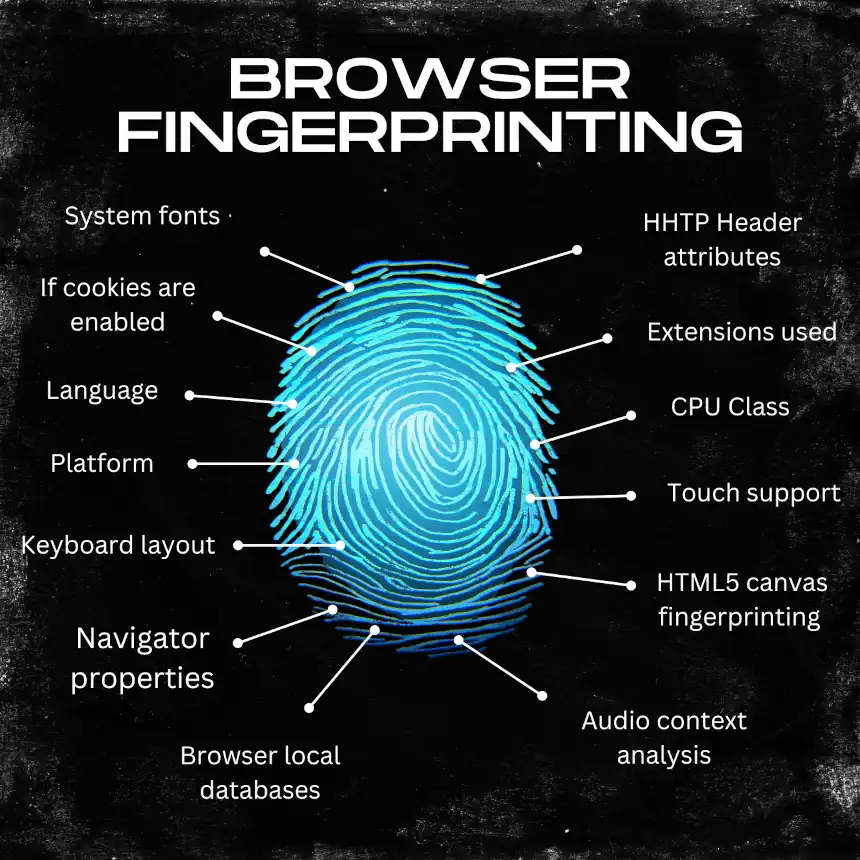
Here are Some Common Fingerprinting Data Points:
- Screen resolution and color depth.
- Installed fonts and system information.
- Timezone and language settings.
- Browser version and plugins.
- Canvas rendering (how the browser draws graphics).
- WebGL (GPU characteristics).
- Audio processing (how your device handles sound).
- Hardware specifications (CPU, RAM).
All this data combined with other user tracking techniques like cookies, active fingerprinting make it easier for 3rd parties to identify who you are in the web.
Privacy Efforts Make You Unique
Interestingly, doing the effort of protecting your privacy on the web by installing privacy-focused extensions, and others will make you more unique among the rest of regular users. The uniqueness itself becomes the identifying factor.
For Example: If you’re one of millions of users with a 1920×1080 screen running Firefox on Windows 11, you blend into the crowd. But you will be a unique user if you’re reporting a randomized 1337×768 screen with UTC timezone. This is like trying to hide on the crowd wearing a neon hoodie with a mask. You will stand out from the crowd.
The Goal of Browser Fingerprinting
Trackers and businesses don’t try to deanonymize you or get your personal information, but instead to track and link your browsing behavior across different websites.
For Example:
- You visit a shoe store (tracker sees fingerprint 12345).
- You visit a coffee shop (tracker sees fingerprint 12345).
- The tracker links both visits and can create a digital profile that says: “user fingerprint 12345 likes shoes AND coffee”.
- Now, next time the user with fingerprint 12345 searches for shoes, they will also ge getting coffee ads.
Fingerprinting Techniques
There are many fingerprinting techniques, but the most common ones are:
Canvas Fingerprinting: When accessing any website, your browser draws text and shapes on a hidden canvas. Different GPUs, operating systems, and fonts render these slightly differently, allowing trackers to uniquely identify you based on the canvas.
WebGL Fingerprinting: This is similar to canvas fingerpritning but with 3D graphics rendering. Your GPU and driver version can create a unique identify of you.
Audio Fingerprinting: Hardware devices process audio slightly differently due to hardware variations and audio processing algorithms, etc. This creates another unique identifier.
Font Enumeration: Websites can detect installed fonts on your system. A unique combination of fonts can identify you.
CSS-based Fingerprinting: New techniques using CSS container queries, @supports, and @import can fingerprint browsers without JavaScript.
Behavior Fingerprinting: Some user patterns can expose users, like tracking mouse movements, typing patterns, and scrolling behavior.
How To Protect Yourself?
There are 2 approaches to protect yourself.
Approach 1: Make Everyone Identical
Privacy-focused browsers like Mullvad, Librewolf, and the Tor browser make the effort to introduce privacy-focused and secure defaults.
The recommendation with this approach is for users to not change the default values (which are already tuned for privacy and security) to make every user present an identical fingerprint (same screen size, timezone (UTC), fonts, and user agent).
This makes every user look the same, but websites can easily detect you are using that browser and may deny access if they don’t want these users to access the website.
Approach 2: Randomize Data Per-Site
Browsers like Brave and Firefox can randomize fingerprint data per site.
Instead of making everyone look the same, randomize your fingerprint data on each website to break tracking across sites. For example, when you visit Amazon, your browser reports one set of characteristics, and when you visit Facebook, it reports different ones.
This makes is harder for trackers to link your browsing activity across sites, but you can still be tracked as someone using anti-fingerprinting techniques, so the success is questionable.
Practical Defense Strategy
Here are some things you can do to minimize the fingerprinting.
Use an Ad Blocker
Install uBlock Origin.
Honestly, this is the best browser extension you can use.
The default installation should work fine for most users, provides great protection, and blocks ads. However, if you do an advanced configuration, you can block scripts, individual trackers, elements in websites, fonts, etc. Always use this.
Use a Privacy-Friendly Browser
Do NOT use Google Chrome, Edge, or Safari. I don’t recommend the Tor browser for regular browser usage either.
I recommend these browsers with their appropriate configuration (check the docs for each)
- Firefox.
- A privacy-friendly Firefox fork like Librewolf.
- Brave browser.
Don’t Manually Spoof Values
For most users, manually spoofing timezone, screen size, or user agents will make them more unique. Just let the privacy-friendly browser do its job.

The Sad Truth
Avoiding fingerprinting is hard (if not impossible). Even with all precautions, trackers with enough resources can likely identify you.
Fingerprinting techniques are difficult to avoid or spoof because they rely on the actual hardware you use and trying to protect your privacy by making privacy-friendly changes to your browser will make you stand out from the crowd.
Even worse, as of February 16, 2025, Google began allowing advertisers using its ads platform to use fingerprinting techniques, making it a more challenging environment for privacy-friendly people (source).
In The End
Even if fingerprinting is hard to avoid, I still recommend it because:
- The ad-blocker will block ads on websites (without it, your Internet browsing experience is reduces 100x, some blogs and news websites are ridden with ads).
- Blocks bad actors and shady websites from creating a profile of you.
- Prevents user cross-link between some websites and reducing the amount of personalized ads and information about you from being public to some of these trackers/businesses.

Additional Resources
Fingerprinting Tests
- Cover Your Tracks - EFF’s fingerprinting test using real tracking companies
- PrivacyTests.org - Regular tests run against several browsers, including LibreWolf
- BrowserLeaks - All-in-one browser testing tool
Further Reading
- Firefox’s Resist Fingerprinting - Technical details on how Firefox handles fingerprinting
- Brave’s Fingerprinting Protection - How Brave approaches the problem
- W3C Fingerprinting Guidance - Browser standards perspective on fingerprinting
- AmIUnique Research - Academic papers on fingerprinting